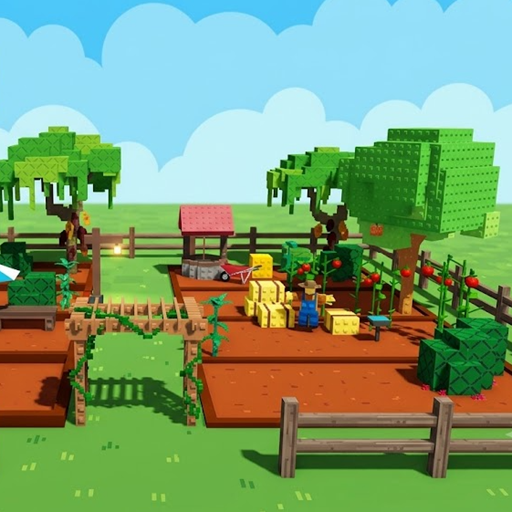
Looking for a relaxing yet addictive farming experience right in your web browser? Grow A Garden brings a fresh, blocky twist to the casual simulator genre.
I spent several hours planting crops, upgrading plot soil, and decorating my farm layout this week. Honestly? It captured that satisfying gameplay loop faster than most full-sized sandbox titles. If you enjoy creative freedom, simple mechanics, and seeing your hard work pay off in digital cash, this game belongs on your radar.
What Is Grow A Garden?
Grow A Garden is an interactive, browser-based farming simulation game built with block-style 3D graphics reminiscent of popular voxel worlds. Players start with a modest patch of dirt and a few basic seeds. By harvesting crops, selling yields, and managing plot space, you gradually expand your farmland into a thriving agricultural paradise.
The goal is straightforward: buy seeds, plant them in designated garden beds, harvest mature crops, and sell them for profit. You can invest earnings into higher-tier seeds like bamboo, cherry blossoms, or giant cacti, along with decorative items like fountains, scarecrows, and fences.
Guide to Play Grow A Garden
Controls
- WASD or Arrow Keys: Move your character around the farm map.
- Mouse: Control the camera angle and select menu UI tabs.
- E: Interact with plots, plant seeds, and pick up grown crops.
- Number Keys (1-9): Hotbar quick selection for tools like your shovel or water bucket.
Gameplay
- Claim Your Plot: Walk up to an unassigned plot labeled Empty Garden to claim it as your farm area.
- Buy Seeds: Click the SEEDS tab at the top of your screen to browse available crops (carrots, tomatoes, corn, and rare trees).
- Plant and Cultivate: Select your chosen seeds from the inventory hotbar and interact with your dirt bed.
- Harvest and Sell: Wait for your crops to mature. Walk over to them, press E to collect, and click the SELL button on top to claim cash instantly.
Practical Tips for Quick Progression
During my initial playthrough, I noticed a few small mistakes that slowed down my cash flow early on:
- Focus on Fast-Growing Crops First: Don't hoard your starting cash for expensive tree seeds right away. Plant quick-turnaround crops like carrots and tomatoes to build a steady cash baseline.
- Utilize the 'Grow All' Feature Wisely: When your farm grows large, manual harvesting takes time. The Grow All option costs in-game currency or gems, but it saves immense effort once you expand to multiple beds.
- Organize Plots by Growth Time: Place short-cycle crops near the main entry point and slow-growing trees along the back perimeter. This simple layout tweak cuts down unneeded walking time across plots.
- Try Out Related Browser Games: If you enjoy open-world creativity and building mechanics, check out our collection of Sandbox Games and Building Games. For players who prefer survival challenges on isolated land, Alone on Island offers a thrilling alternative.
Frequently Asked Questions
Is Grow A Garden free to play on browser?
- Yes. You can play the full game directly in your web browser without paying anything or making compulsory purchases.
Can you save your farm progress in Grow A Garden?
- Yes. Your progress saves automatically in your local browser storage as long as you use the same browser and device.
Can you customize your farm layout with decorations?
- Yes. You can freely buy and arrange decorative blocks, wells, stone fountains, and custom fencing to design a unique garden layout.
Is Grow A Garden multiplayer?
- Yes. You can view neighboring player gardens in real-time within the same server room and compare farm layouts.